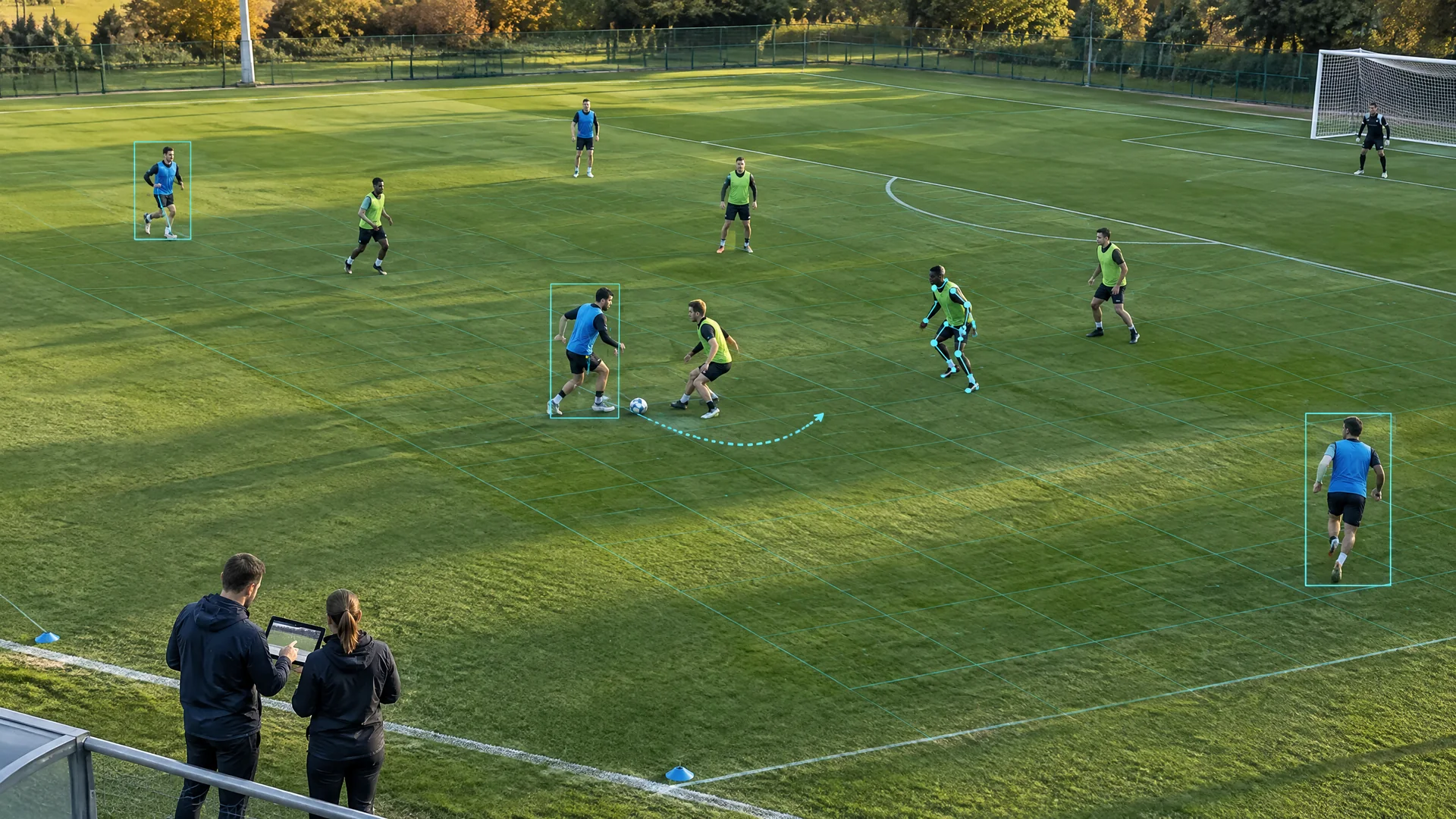
What is AI video analysis in sports?
AI video analysis in sports uses computer-vision models to turn frames into structured observations such as player locations, ball paths, body landmarks, event labels or candidate clips. A complete workflow preserves the original footage, records how each observation was produced and sends uncertain or important findings to a person who understands the sport.
The output is evidence for review, not a complete coaching answer. A box around a player is a detection. A connected series of boxes is a track. A heatmap is a summary of those estimated positions. A claim about team shape, technique or decision quality adds another interpretation layer. The wider computer vision in sports explains the visual model families; this page follows the evidence chain from footage to an analyst's usable record.
Start with the decision, not the model
A useful project begins with one decision: find all corner kicks for tomorrow's review, compare a winger's starting position across ten possessions, or check whether a drill was performed with the agreed spacing. Each question implies a different camera view, label definition, deadline and acceptable error. “Analyse the match” is too vague to test.
Write down who will use the output and what they will do next. A clip-search tool may tolerate extra false positives because an analyst can reject them quickly. An output used in selection, officiating or a return-to-play discussion needs a much higher evidence threshold and may be inappropriate for automation. The decision-first approach in sports analytics helps keep a model tied to a real sporting question.
Choose the right footage
Broadcast video, a fixed tactical camera, a calibrated multi-camera system and a phone clip are not interchangeable inputs. A broadcast feed offers close views and many angles, but pans, cuts, zooms, replays and graphics interrupt continuity. A high fixed view keeps team shape visible but may leave the ball too small. A close phone view can help with one movement task while losing the field context needed for tactics.
Choose footage that shows the event at the detail and duration the decision needs. Record frame rate, resolution, camera position, zoom behaviour and known gaps. If several cameras are used, their clocks must be aligned. A model cannot recover an event that was never in frame, and a smooth dashboard should never conceal missing source footage.
Step 1: ingest, time and preserve the source
The first stage copies or receives the video, checks that the file or stream is complete and associates it with the correct event, period, camera and rights record. Timestamps are normalised so the same moment can be found across feeds, event logs and sensor data. The untouched source should remain available for review even when a lower-resolution proxy is created for faster processing.
This stage looks ordinary, yet many analysis errors begin here. A missing segment can appear as an athlete suddenly teleporting. A replay can be mistaken for a second live event. A clip from the wrong period can be joined to a valid tracking file. Checksums, camera identifiers and a clear live-versus-replay flag make later findings traceable.
Step 2: detect players, balls, lines and landmarks
Detection examines individual frames and proposes the locations of relevant objects. The result may be a box around a player, a pixel mask around the pitch, a point for the ball or body landmarks at joints. Each class needs a label definition. A goalkeeper, substitute near the touchline and referee may look similar in one frame but have different analytical meaning.
The ball is often the hardest object: it is small, fast, blurred and easily hidden. Player detections can also include spectators in similar colours or miss an athlete behind another body. Detection metrics should therefore be reported by class and condition. A high average score can hide the exact failure that matters to the use case.
Step 3: track identity through time
Tracking links detections across frames and attempts to keep one identifier attached to the same player or ball. Motion, appearance, team colour, jersey number and recent position can all contribute. The tracker should also have an unknown state rather than forcing every reappearance into a confident identity.
Occlusion is the critical test. When players cross, tackle or form a dense group, identities can swap. That single switch can corrupt distance, speed, possession or workload attributed to both people. The original detection history and correction record should remain visible. computer vision player tracking provides the detailed control plan for handovers, uncertainty and manual correction.
Step 4: calibrate positions and align views
A pixel location becomes a sport-space location only after calibration maps the image to known field or court geometry. Visible lines or surveyed points can support a two-dimensional mapping; several synchronized views may support three-dimensional reconstruction. A pan, zoom, vibration or moved tripod can invalidate an earlier mapping.
Calibration error travels directly into distance, speed and spacing outputs. A movement trail can look plausible while sitting a metre from the real position. Systems should retain the calibration version and mark frames that were interpolated or could not be mapped. For a deeper implementation guide, use camera calibration for sports analytics.
Step 5: recognise events and build clips
Event recognition combines observations across time to propose actions such as a pass, serve, shot, sprint, tackle or set-piece phase. A simple rule may be more suitable than a learned classifier when the event is already defined by reliable data. The model should return the source interval and confidence, not only a label.
Automated tagging is most useful when it shortens search. An analyst can accept, correct or reject candidate clips and add sport-specific context. The weekly workflow in AI-assisted sports video analysis shows how a small taxonomy, review queue and correction log prevent fast labels from becoming untraceable archive metadata.
Step 6: turn observations into analyst-reviewed evidence
Higher-level analysis may combine positions and events into heatmaps, spacing measures, phase summaries or candidate tactical patterns. That layer should state what was observed, what was estimated and what was inferred. A formation guessed from one broadcast frame is not equivalent to a formation verified across a settled phase with complete player coverage.
The analyst adds the context the video cannot contain by itself: the coach's instruction, the score state, the opponent's behaviour, a planned rotation or an injury restriction recorded elsewhere. The final note should link back to representative footage and identify uncertainty. The person reviewing it remains free to disagree with the model.
What AI video analysis can support
Useful applications include searchable match archives, candidate-event tagging, player and ball tracks, technique review, phase-of-play summaries, broadcast clipping and pre-match examples. A coach may use a set of clips to discuss spacing. A broadcaster may use event markers to find highlights. A performance team may use a controlled camera to compare a movement task over time.
The value comes from reducing repetitive search and making the evidence easier to inspect. It should be measured in workflow terms: time to a reviewed clip, percentage of relevant events found, number of false tags, identity corrections and whether the output arrived before the decision deadline. More detections do not automatically mean better coaching.
What video alone cannot prove
Video can show visible movement under a particular view. It cannot by itself establish pain, fatigue, motivation, tactical intent, medical readiness or future potential. A pose estimate is not a diagnosis. A slow movement may reflect a coaching task, field condition or score context rather than poor effort.
These limits matter when the output affects opportunity or health. Combine video with appropriate professional judgement, athlete input and other records only when there is a legitimate purpose. The athlete performance tracking guide explains how separate observations should enter a decision rather than collapse into one hidden readiness score.
Validate each stage separately
Detection, tracking, calibration, event recognition and tactical interpretation need different tests. Precision and recall can assess detections. Identity-switch counts and track continuity help assess tracking. Position error against known points tests calibration. Event labels need a reviewed reference set with clear definitions. Tactical conclusions require qualified human comparison and may remain uncertain.
Do not quote one model score as the accuracy of the entire system. A detector can perform well while the tracker swaps two similar players, and a stable track can still be mapped badly by a moved camera. Report results by venue, view, light, sport and difficult condition. Error examples often teach more than one blended percentage.
Common failure conditions and fallback rules
Common failures include occlusion, motion blur, small balls, low light, rain, glare, camera cuts, zoom changes, similar uniforms, unreadable numbers, missing timestamps and action outside the frame. A model trained on one competition may also fail when kit, camera height, field markings or style of play changes.
Set the fallback before deployment. The system might flag a clip for manual search, mark the identity unknown, suppress a spatial metric after calibration drift or stop producing a live output when latency exceeds the agreed limit. A defensible workflow can decline to estimate. It should not fill every gap with a confident-looking line.
Privacy, rights and youth-sport safeguards
Sports footage can identify athletes, officials, staff and spectators. Derived tracks can reveal attendance, location and behavioural patterns. Define the purpose, access roles, retention period and permitted reuse before collecting more video. Rights to record a match do not automatically grant rights to train a model, publish an identifiable clip or reuse footage in a sales demonstration.
Children and community participants need clear, age-appropriate information and a practical complaint route. Store only the views and fields needed for the stated task, protect exports and delete material when the purpose expires. Human review should include a way to correct identity and labels without erasing the original automated record.
A practical pilot checklist
- Name one sporting decision and one accountable user.
- Specify the event, object or movement that must be visible.
- Choose footage that preserves the required detail and continuity.
- Build a reviewed reference set containing clean and difficult examples.
- Test detection, identity, timing and interpretation separately.
- Define uncertainty flags, correction steps and stop conditions.
- Review rights, privacy, retention, security and participant communication.
- Run the pilot through the real decision deadline before expanding it.
A pilot passes when the reviewed output improves the named workflow with acceptable errors and understandable limits. It does not pass because an annotated demonstration looks convincing. If manual tagging meets the need with less risk or cost, that can be the better operating decision.
Choose the next specialist guide
Use AI in sports for model governance and decision ownership, or computer vision in sports for the broader visual pipeline. If positions do not line up with the field, continue with camera calibration. If player IDs fail during close play, continue with the identity-tracking guide. If the main problem is clip throughput, use the video-tagging workflow.
For a wider map connecting AI, analytics, wearables, venues and media systems, use sports technology master guide. The right next page is the one that matches the first weak link in the evidence chain, not the one with the most advanced model name.